API Gateway Testing
API Endpoint Testing
Assert endpoint connectivity by using a web browser to access the URL endpoint:
https://<HOSTNAME>/health
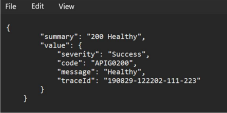
On a successful connection, the endpoint should return the following result:
Get the Token
Use the following curl command to acquire a valid JWT token. Replace the placeholder values with those for your instance under test:
curl --location 'https://<HOSTNAME>/apigator/identity/v1/token' \
--header 'X-Api-Key: <API KEY>' \
--header 'Content-Type: application/x-www-form-urlencoded' \
--data-urlencode 'client_id=<CLIENT ID>' \
--data-urlencode 'client_secret=<CLIENT SECRET>' \
--data-urlencode 'grant_type=client_credentials'
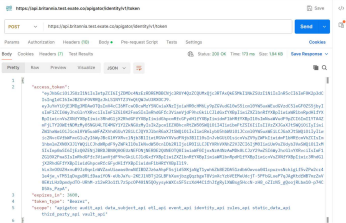
On successful completion you should receive a response like:
