Enabling Notifications
Enable Notifications
Go to the Vault User Interface and log in with the Tenant Administrator you would like to enable notifications for. Then add the Entitlement System Configuration:
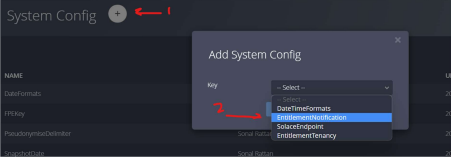
- Navigate to System Config from the sidebar menu
- Click the "+" button to add a new System Config
- Choose Key:
EntitlementTenancyand click Submit - Click the "+" button to add another new System Config
- Choose Key:
EntitlementNotificationand click Submit
Edit Entitlement System Configuration
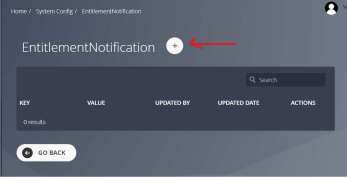
- Once the SystemConfig records have been added, find the
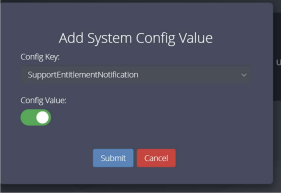
EntitlementNotificationrecord and click the pencil to edit - Click the "+" button to add a record
- Ensure the toggle is set to on for
SupportEntitlementNotification
Add Solace Endpoint
- Navigate to Data Sources, API Connection, Solace from the sidebar menu
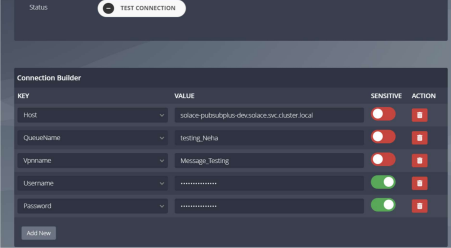
- Click the "+" button to add a new Solace record
- Fill in the Solace instance name and connection details
- Click Test Connection
- Once successful, click Save
Add Solace System Configuration
- Navigate to System Config from the sidebar menu
- Click the "+" button to add a new System Config
- Choose Key:
EntitlementTenancyand click Submit
Edit Solace System Configuration
- Once the SystemConfig record has been added, click the pencil to edit
- Click the "+" button to add a record
- Ensure the Value is set to the Solace Endpoint configured in the previous section, then click Submit