Tenant Creation and Users
Global Administrator
Go to the Portal User Interface and log in with the global administrator account (administrator@templatefirm.com).
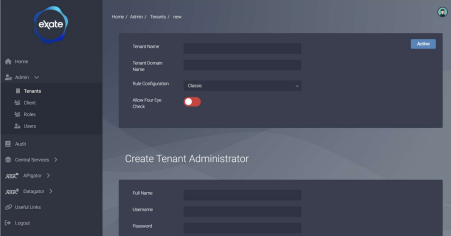
Create the Tenant
This task creates the Tenant in the eXate platform and specifies the initial administrator account for that Tenant.
- Navigate to Admin, Tenants from the sidebar menu
- Click the "+" button to add a new Tenant
- Fill in all the required information on the form and click Save

Tenant Administrator
Go to the Vault UI and log in with the Tenant Administrator created in the previous step.
There are two configuration options for Tenant services:
- Tenants can share the same REST services
- Tenants can be assigned their own REST service endpoints for process isolation
These options are controlled using the exateportal environment variable in values.yaml: IS_EXECUTION_CONTEXT_ENABLED.
trueenables dynamic endpoint configurationfalseuses system-configured REST endpoints
If you want to use dynamic endpoint configuration, follow the Create Zone and Create Namespace steps below. Otherwise, you can skip them.
Create the Zone
This task creates the default zone for the Tenant.
- Navigate to Zones from the sidebar menu
- Click the "+" button to add a new zone
- Fill in all the required information on the form and click Save
Create the Namespace
This task creates the namespace and associated endpoints for a given Tenant.
- Navigate to Namespace from the sidebar menu
- Click the "+" button to add a new namespace
- Fill in all the required information on the form and click Save
- Add a new Discovery endpoint with the value set to the ingress host for the tenant
- Add a new ETL API endpoint with the value set to the ingress host for the tenant
- Add a new APIgator API endpoint with the value set to the ingress host for the tenant
All hosts configured in steps 4 to 6 should use HTTPS and have a trailing slash, for example https://discovery-api.host.com/.
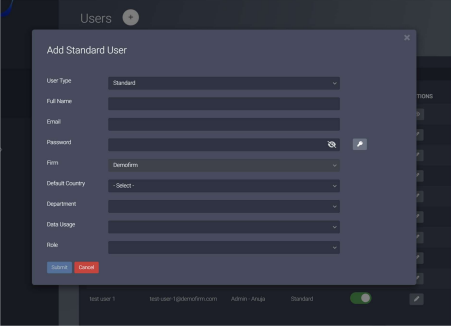
Create Users
This task creates additional user accounts for a given Tenant.
- Go to the Portal UI
- Navigate to Admin, Users from the sidebar menu
- Click the "+" button to add a new User
- Fill in all the required information on the form and click Save
There are three user types:
- Execution: system accounts
- Invite: invite users to the platform (requires SMTP configuration)
- Standard: specify the credentials of the new user directly